
Introduction to uv: The Best Python Package Manager
Simplify your Python setup with a faster Python package / project manager

If you’re a Python user, you’re likely familiar with pip, for managing Python packages and dependencies. But have you heard of uv before? It’s a relatively new Python package manager compared to pip and poetry as uv came out in 2024.
I initially started using uv as a drop-in replacement for pip. Right away, I noticed a significant improvement in Python package installation time. I knew uv offered far more than pip, but it wasn’t until 2025 that I learned to use it more extensively. And I’ve used it in every Python project since.
If you’ve been curious about uv but haven’t pulled the trigger yet, this article is for you. I hope it helps move the final needle toward getting started with uv.
In this article, I’ll cover these topics:
What is uv?
3 reasons You should start using uv
Getting started with uv
What is uv?

uv is an open-source Python package and project manager, written in Rust. If you remember a time when Rust was the hottest topic in data, that was around the time uv first came out. A key thing about uv is that it’s not just a package manager, it’s a modern Python project manager.
It handles things like:
Python versions
Virtual environments
Dependencies
Lockfiles
Project execution
In the next section, I’ll give you my 3 reasons to use uv.
3 Reasons You Should Use uv
1. It’s extremely fast
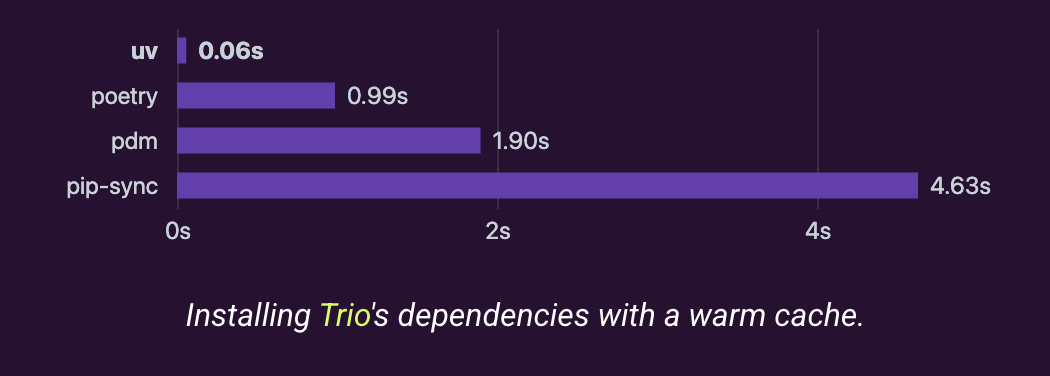
uv is fast. Using uv to install Python packages versus pip is like night and day. Although I haven’t timed it myself, there are many occasions where pip would make me wait several seconds, while uv feels almost instant and saves me a lot of time. More importantly, it just feels good to be able to install packages that fast. Here’s one benchmark the uv webiste published:
2. One tool instead of many
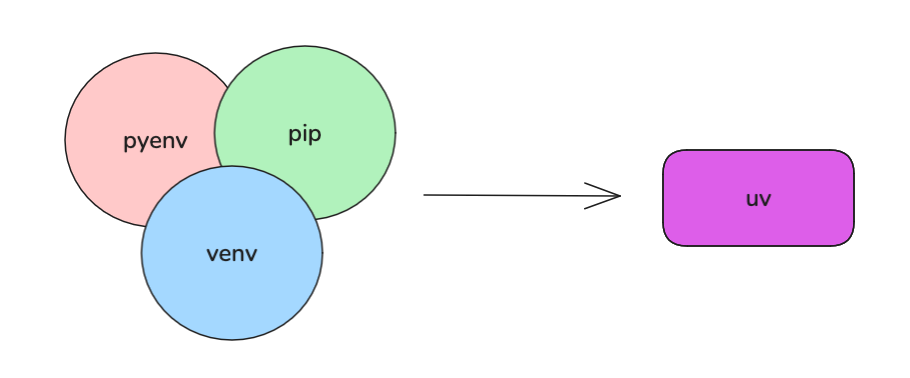
Before uv, I was using:
pyenv to manage different Python versions
venv / virtualenv to manage virtual environments
pip to install packages.
With uv, I now use a single tool to handle all of that.
3. Drop-in compatible with existing projects
You can start using uv immediately on existing Python projects without:
Changing your dependency format
Migrating to a new project structure
Forcing teammates to learn a new packaging model
In many cases, you just replace the command you run. uv can work with the same things you already have such as requirements.txt and pyproject.toml.
You don’t need restructure or migration to use uv on an existing Python project.
Getting Started With uv
Alright, enough talking, let’s see how you can get started with uv.
New projects
Make sure you have installed uv via brew, pip, or curl/powershell.
To start a Python project with uv, run:
uv initThis creates a project directory with initial files including pyproject.toml and main.py.
To create a virtual environment, run:
uv venv # or specify a python version "uv venv --python 3.12"uv automatically find the virtual environment, so you won’t need to explicitly activate it like we used to:
source .venv/bin/activate # don't need this anymore To install / remove packages:
uv add your_packageuv remove your_packageNow, you can run your Python project with by adding this infront of your command:
uv runSo, if you’re running main.py, then the command becomes:
uv run python main.pyLocking and syncing dependencies are automatic in uv, meaning when you run “uv run xxx”, it automatically lokcs and syncs the dependencies. But if you want to lock / sync explicitly, you can run:
uv lock
uv sync
Existing Python projects
To migrate to uv, with dependecies defined in requirements.txt:
uv add -r requirements.txtTo keep using pip to manage dependencies:
uv pip install -r requirements.txt  # from requirements.txt file
uv pip install -r pyproject.toml  # from pyproject.toml file
You can keep using pip with uv:
uv pip your_pip_commandAs you can see, uv doesn’t force you to fully adopt uv-specific workflows. It gives you the option to migrate gradually, or to keep using your existing project setup as you always have.
Limitations
The only limitation I see with using uv is that you need to install it (duh), since it doesn’t come bundled with Python or your operating system. You might also argue that having a commercial company backing an open-source project is a risk. I understand that concern, but if the company’s direction and the community’s needs start to diverge, someone will likely fork the project, making sure that a working tool continues to be developed and maintained by the community. Like we always say, money has to come from somewhere…
Summary
Have I convinced you to give uv a try? I promise you won’t regret trying it out. In fact you may regret not trying it out sooner. uv’s website is very comprehensive, and I highly recommend it to get started with uv.
The compatibility was what made me try it out last year, such a powerful tool!
Great write up Yuki! I've been meaning to use uv for the reasons you mentioned, and this article was just the push I needed to finally get started.